
Making Our Social Videos in Code with Remotion
How we build TikTok, Reels and Shorts promos as React code with Remotion: real gameplay, the real map, cuts on the beat, and AI kept to three jobs.
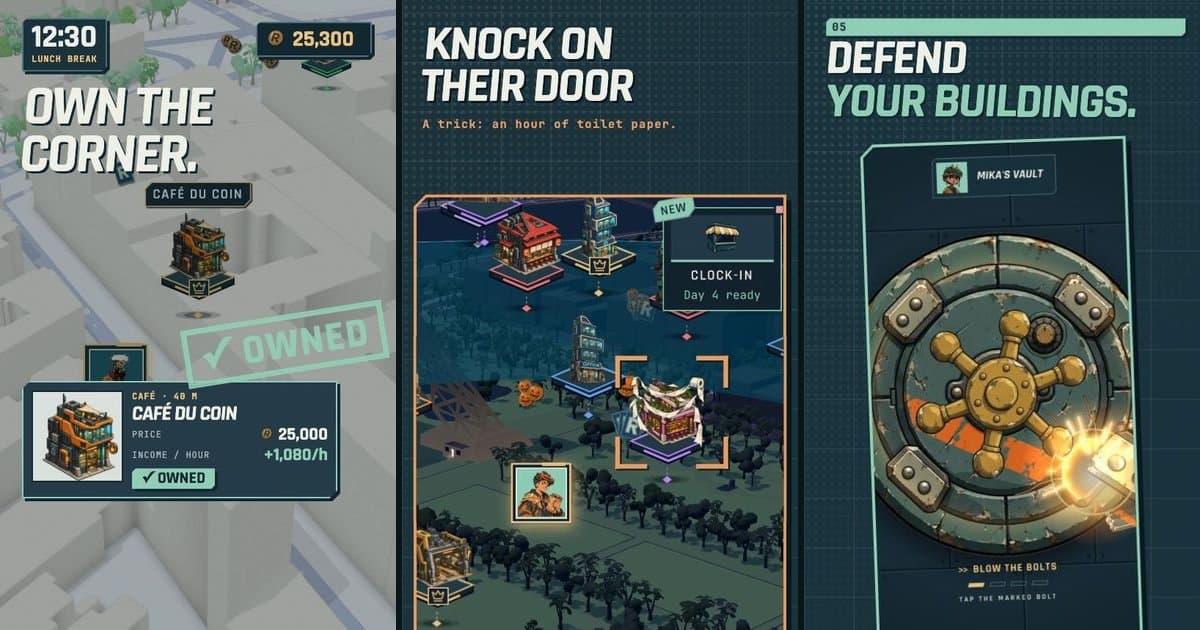
A location-based game is hard to sell in a screenshot. What makes Retropolis fun is movement: you walk past a café, it becomes your building, it pays you while you sleep, and one night a rival tries a Hold-up on it. That story needs video, and short vertical video is where new players find games now.
We are a small studio, so we can't afford an editor for every cut and every language. We built our videos in code instead, with Remotion, a library that renders React components to MP4. Between late September and mid-October 2026 that pipeline produced nine cuts, from a 22-second fighting-game montage to a 50-second explainer for newcomers. This post covers how it works and what we learned.
Why code instead of a timeline
A video editor is faster for one video. Code wins once you multiply:
- Languages. Every cut ships in English and French, and the App Store preview and the Halloween teaser ship in five languages. In code, a language is a
copy.tsfile, and the render script loops over it. - Variants. We render every language with and without music, so a trending sound can be added inside TikTok or Instagram without fighting our track.
- Fixes. A typo in a caption, a changed price, a renamed feature: we edit one string and re-render, instead of reopening nine projects.
- Assets. The promo project lives in the game's monorepo. Its
public/assetsfolder is a link to the game's own asset package, so the videos play the real sound effects and use the same HD illustrations as the app.
Each cut gets its own folder: timing.ts for the beat map, a copy.ts per language, a scenes/ folder, and one top-level component registered in Root.tsx. Social cuts are 1080×1920 at 30 fps.
Cutting on the beat, in code
Good promo videos cut on the music. Doing that by hand means scrubbing waveforms. We analyse each track once with a script that writes its tempo, first beat, beat times and loudness to JSON, then every scene is described in beats, not frames:
export function beatGrid<S extends string>(track: Track, scenes: Record<S, readonly [number, number]>, tail = 18) {
    const beat = (n: number) => Math.round((track.firstBeat + (n * 60) / track.bpm) * FPS);
    const sceneFrom = (name: S) => (scenes[name][0] === 0 ? 0 : beat(scenes[name][0]));
    const sceneLength = (name: S) => beat(scenes[name][1]) - sceneFrom(name);
    // ...
}
A cut's timeline then reads like a song structure. This is the "Routine" cut, a day in the city on 70s crime funk at 120 BPM:
export const ROUTINE_SCENES = {
    hook: [0, 4],
    walk: [4, 12],
    buy: [12, 20],
    heist: [20, 30],
    night: [30, 40],
    end: [40, 46],
} as const;
The café is bought on beat 12, when the band comes back in. The night scene runs through the track's break. If we swap the track or trim four beats, every scene moves with it.
The best moment we found this way was an accident of analysis. In the "Gotcha" cut, a rival breaks three locks on a trapped building, and each lock snaps on one of the isolated ticks in the music's near-silent break. Sparse hits on isolated sounds in a quiet stretch land much harder than hits on a busy bar. We now look for those spots in every track's per-beat analysis before we write a scene.
The real map, rendered frame by frame
The map is the game, so the videos use the real one. Our GameMap component creates a Mapbox GL map with the same style and light presets as the app (day, dusk, night) and moves its camera as a function of the frame number:
<GameMap
    preset="dusk"
    camera={(frame) => ({ position, altitude, target })}
    overlay={(project, frame) => <Markers project={project} />}
/>
// simplified: the real cuts pass a camera path and a marker list per scene
Two details make it work in a renderer:
- Wait for the tiles. Remotion renders frames in a headless browser and doesn't know when Mapbox is done drawing. For every frame we call
delayRender, trigger a repaint, and onlycontinueRenderwhen the map fires itsidleevent. No half-loaded tiles reach the video. - Project the game layer onto the street. The overlay receives a
project(lngLat)function that uses the same camera as the frame being captured. Building markers, crowns, coins and the player's puck, rebuilt from the app's own marker components, land exactly on the right corner while the camera flies.
Map-only scenes are rendered once to MP4 with Chrome's ANGLE GL backend and then reused inside the cuts, so iterating on titles doesn't re-render the 3D map every time. The places on that map are real ones; we explained where they come from in Real-World Buildings Without Breaking the Bank.
Real captures, retimed to the music
For screens like contracts, the vault mini-game or the city chat, we film the app itself. Takes are recorded from the iOS simulator with xcrun simctl io booted recordVideo, converted to 30 fps, then placed on the beat grid with a Capture component that takes a list of { at, from, rate } segments: from frame at of the scene, play the take from second from at speed rate. Speed ramps, jumps and freezes (rate: 0) are one line each, so a slow walk to a building fits in eight beats and a reward stamp can hold on the downbeat.
Some takes need a precise game state: a specific contract, a rival's building, a trap that springs. Those are filmed against an isolated local copy of the backend with fictional accounts, driven by a temporary in-app script, so a take can be replayed identically and no real player's data ends up in an ad.
Where AI is allowed, and where it isn't
We wrote one rule into the project's instructions: show only the real game. A fully generated trailer has a recognisable "AI look", and worse, it promises a game we didn't make. So AI does three jobs and nothing else:
| Job | What it does | Typical cost |
|---|---|---|
| Motion | Animates an existing character portrait (image-to-video) | about $0.56 per 5 seconds |
| Voice | The fight-game announcer lines | fractions of a cent |
| Music | A clip or a full track in a brief we write | $0.04 to $0.08 |
No generated scenes, no generated UI, no new characters. Every generation is logged in a cost file and cached, so a re-render never pays twice. Most cuts cost under a dollar in generation fees.
We tested the limits and kept the rejections in our notes. An animated background of a courier on a scooter looked uncanny, so it was cut. A cardboard-diorama street built from generated layers looked flat and mechanical, so it was cut too. What replaced both was a camera dive from the sky to street level through the real 3D map at dusk, which cost nothing to generate.
The cuts so far
| Cut | Length | Angle |
|---|---|---|
| VS | 22 s | Fighting-game montage of the characters, phonk at 150 BPM |
| Dispatch | 25 s | Solo progression, from the 3D map dive to the leagues |
| Routine | 23 s | A day in your city: walk, buy, Hold-up, get paid at night |
| Gotcha | 23 s | Revenge with a trapped building |
| Patch | 52 s | Season 12 trailer for existing players |
| Done | ~65 s | Teaser for contract markers and map mini-games |
| Routine 2 | 28 s | The App Store preview, real captures only, five languages |
| Halloween | 26.5 s | Teaser for the yearly event, five languages |
| Welcome | 50 s | The game explained to people who have never played it |
The App Store preview follows stricter rules than social cuts: Apple accepts only footage captured from the app itself, so the map layer we rebuild in code and the animated portraits are out. We describe that constraint, and the rest of our store work, in Our Store Listing Is Built Like the Game.
Shipping
One command renders a cut in every language, with and without music. Captions stay clear of the bottom 300 pixels, where TikTok puts its own interface. Renders are uploaded to an admin page for review before anything is posted.
What we'd tell another indie developer
- Start from what you already have. Our first cut used existing illustrations, existing sounds and a single generated music clip. The code you write for it becomes a kit (titles, stamps, counters, wipes) that the next cut reuses.
- Describe time in beats. It is the single change that made the edits feel professional.
- Render your real product. If your game has a map, put the real map in the video. If it has UI, film the UI. It is cheaper than generating a fake, and players who install from the video find the same game.
- Keep a cost log. One line per generation, and a cache keyed on it, means you never pay twice for the same clip.
The tools that made this pipeline fast to build are the subject of another post: AI Coding Agents on a Live Game. And if you want to see the real thing instead of the trailer, install Retropolis or read what kind of GPS strategy game it is.